When a short link on your own domain shows a “page not found” error or lands on the wrong page, it’s almost always one of the causes below. Start by opening Tools > UTM Builder > Short Links and searching for the link, since that tells you whether it still exists and where it goes.
Your permalinks are set to Plain
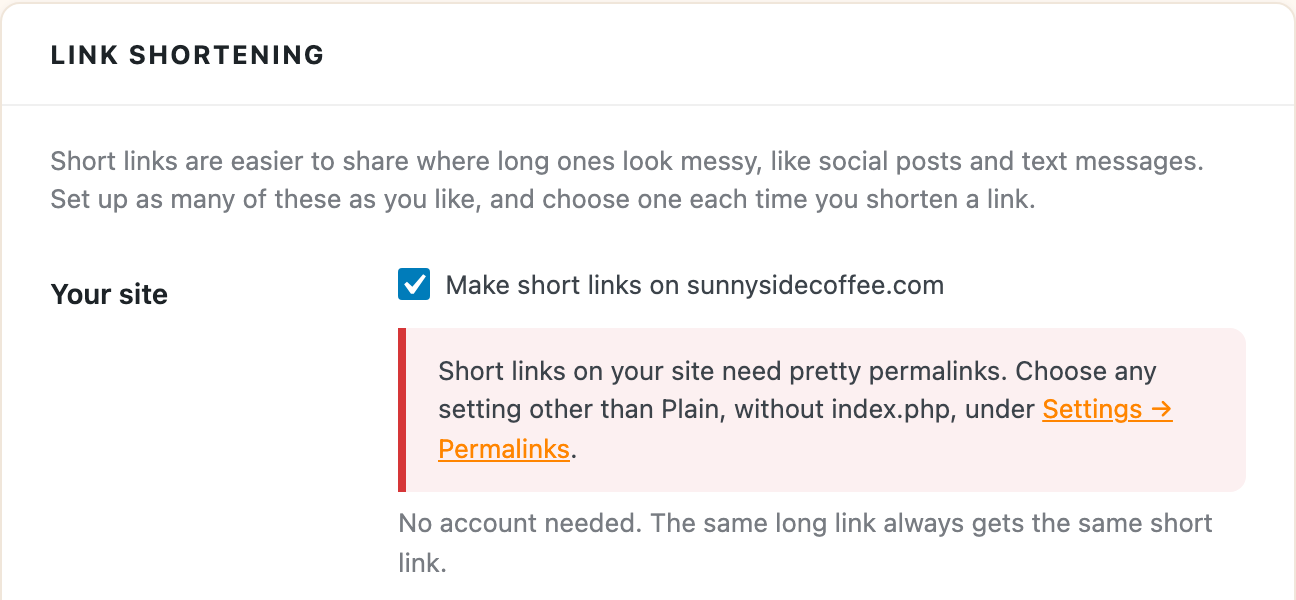
Short links on your own domain need pretty permalinks. If your site uses the Plain setting (addresses like yoursite.com/?p=123), or has index.php in its addresses, the server never hands a short link to WordPress.
Go to Settings > Permalinks, choose any setting other than Plain, and save. Tools > UTM Builder > Settings shows a red notice under Link shortening when this is the problem.
The ending was changed
A short link keeps one ending at a time. If someone changed a link’s ending on its Details page, the old ending stopped working at that moment. Search the Short Links tab for the page it goes to, and either share the new ending or change it back.
The link was deleted
A deleted short link gives a “page not found” error to anyone who clicks it, and it can’t be brought back. Deleting a batch doesn’t delete its short links, but deleting a short link on the Short Links tab does, and so does deleting the plugin with Delete presets, batches, short links and settings when the plugin is deleted turned on.
You can make a new short link with a custom ending that matches the old one, as long as nothing else uses that address. See choose your own ending.
The plugin is turned off
UTM Builder is the part that sends visitors from the short link to the full link, so short links stop working while it’s deactivated. Turn it back on under Plugins and they work again.
A page now uses that address
A real page always wins over a short link at the same address. WordPress won’t give a new post or page an address a short link already uses, but a page can still end up there another way, like a post imported from somewhere else or a page added by another plugin. Rename that page’s address, or give the short link a different ending.
You added a word in front of your short links
If you set a word under Short link address in Settings, like g, new short links look like yoursite.com/g/x8d89c. Links you’d already shared without the word keep working, so this is rarely the cause, but check that the link you’re testing was copied in full.
A cache or security plugin answers first
Some caching, firewall and redirect plugins answer “page not found” addresses themselves before WordPress gets a chance. If none of the above fits, add a word in front of your short links under Short link address, like g, which has them answered before WordPress looks for a page. Then try the same link with the word added, like yoursite.com/g/x8d89c, in a private browser window. If that works, the other plugin was catching the shorter address, and you can either keep the word or look in that plugin’s settings for a way to leave those addresses alone.
The link goes to the wrong page
That’s the page in Goes to on the link’s Details page. Change it and click Save changes, and everyone who clicks the short link from then on lands on the new page.