Go to Tools > UTM Builder and stay on the Link Builder tab. Fill in the page and the tags, and your link updates as you type.
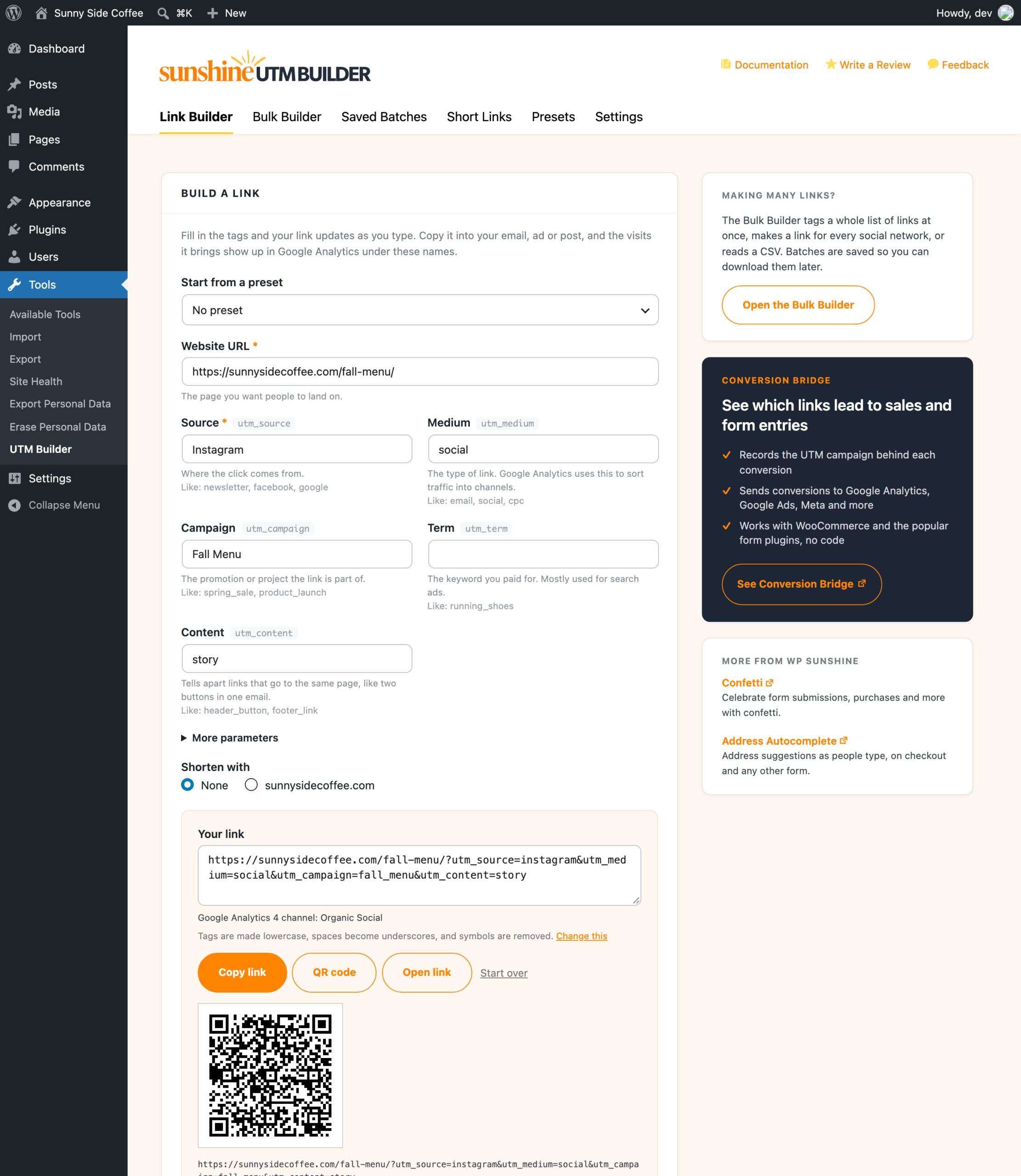
The page
Website URL is the page you want people to land on. It needs to be a full web address that starts with https://, and it can be on any site, not only yours.
The five tags
Only Source is required, because Google Analytics needs a source to report a link’s campaign, and the rest are optional.
| Field | Tag in the link | What it’s for | Examples |
|---|---|---|---|
| Source | utm_source |
Where the click comes from | newsletter, facebook, google |
| Medium | utm_medium |
The type of link. Google Analytics uses this to sort visits into channels. | email, social, cpc |
| Campaign | utm_campaign |
The promotion or project the link is part of | spring_sale, product_launch |
| Term | utm_term |
The keyword you paid for, mostly for search ads | running_shoes |
| Content | utm_content |
Tells apart links to the same page, like two buttons in one email | header_button, footer_link |
Source and Medium offer common values as you type, spelled the way Google Analytics expects them. If your team keeps its own list, team lists put those in the suggestions instead.
Under your link, the builder shows which Google Analytics 4 channel the visits will be counted in, like Email or Organic Social, and warns you if they’d end up as Unassigned. The GA4 channel check explains how that works.
Start from a preset
Once you’ve saved a preset, a Start from a preset menu shows at the top of the builder. Pick one and its tags are filled in, with any tokens like {slug} worked out for the page in Website URL. You can still change any tag after that. See presets and tokens.
Other parameters
Open More parameters to add anything besides the five tags, one per line, like ref=partner or utm_id=summer. These are added exactly as you type them. The formatting rules don’t touch them, since things like coupon codes and affiliate IDs can care about capital letters.
What happens to the page link you paste
- Any UTM tags already on the link are replaced with the new ones, and its other parameters, like
?ref=abc, stay as they are. - If the link has an
#anchorat the end, the tags go in front of it. Tags placed after a#never reach Google Analytics. - Your tags are cleaned up with the formatting rules from Settings. A line under the link says which rules are on, with a Change this link.
Copy, check and share it
- Copy link copies the full tagged link.
- Open link opens it in a new tab, so you can make sure the page loads.
- QR code makes a QR code you can download as PNG or SVG. See QR codes.
- Start over clears the form.
Make it shorter
When a link shortener is set up, Shorten with sits right above your link. Pick your own domain (it’s listed by name, like yoursite.com), Bitly or Rebrandly, and a Short link box shows up under your link with its own Copy button. Short links on your own domain are on from the start. See short links on your own domain.
The same long link always gets the same short link on your own domain, so building a link twice won’t leave you with two short links to keep track of.